Kitchen display system for restaurants in Ethiopia
A Kitchen Display System Connected to Every Order
Whether an order starts from a customer QR code or a waiter, Bilu routes it into the restaurant's configured kitchen workflow so preparation stays connected to the same order system used by cashier and admin.
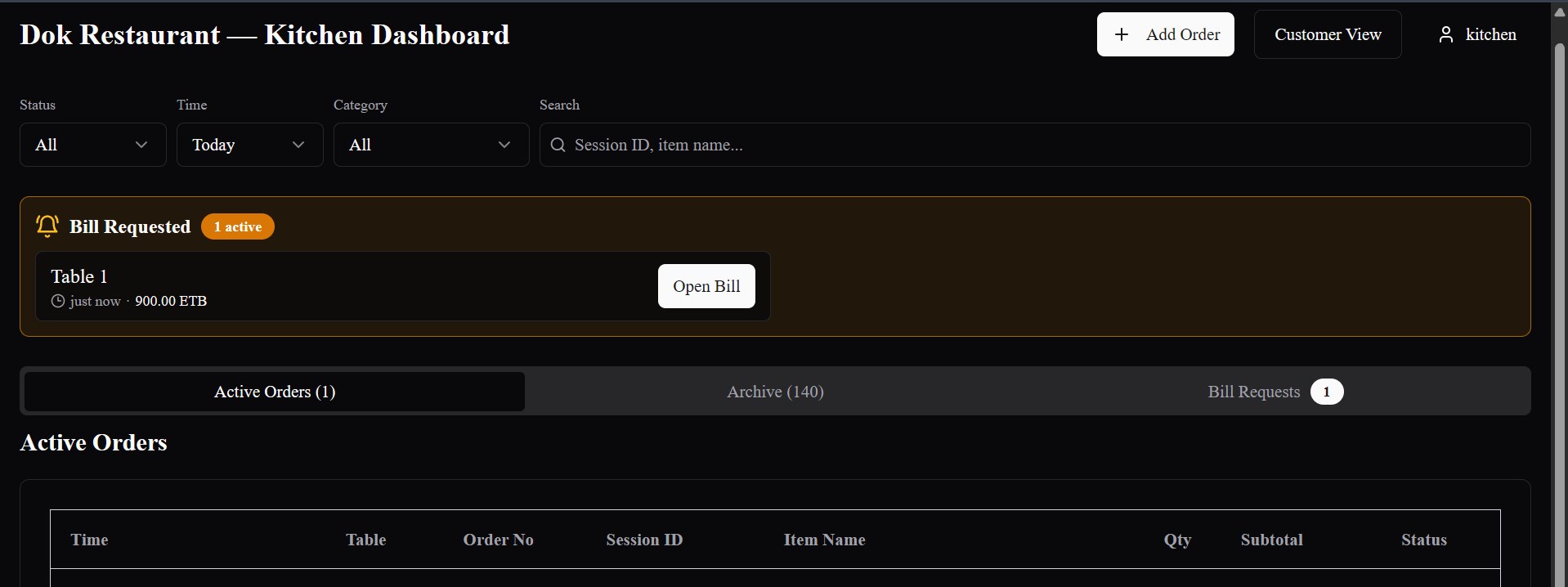
Preparation
Kitchen station views
Connected next
Cashier · billing
After the order is placed
Orders should not stop at the ordering screen.
Taking the order is only the beginning. Kitchen staff need clear digital visibility into the items and preparation details that follow. Bilu connects submitted orders directly to the kitchen workflow.
One kitchen workflow
QR orders and waiter orders converge before preparation begins.
Customer QR ordering
The customer places the table order.
The submitted order carries its table, items, quantities and configured choices into Bilu.
Explore QR OrderingBilu Kitchen Display System
Waiter ordering
The waiter submits from the table.
The staff-led order enters the same configured kitchen workflow as a customer QR order.
Explore Waiter OrderingHow Bilu's kitchen workflow works
Move submitted orders into configured preparation work.
The sequence follows the restaurant's setup and keeps kitchen progress connected to the wider order, whether the workflow uses one Main Kitchen or multiple configured stations.
01
Submit
The order enters Bilu
A customer QR order or waiter order is submitted with its restaurant, table, items, quantities and configured choices.
02
Context
Table and order details stay attached
The kitchen workflow keeps the relevant table and order context alongside the work to prepare.
03
Routing
Configured assignments are evaluated
Menu items follow the restaurant's explicit kitchen-station assignments where those assignments exist.
04
Fallback
Unassigned items retain a default path
Items without an explicit station assignment follow the restaurant's protected Main Kitchen fallback.
05
Station view
Kitchen staff see assigned work
Station-based kitchen views show active preparation work for the stations available to that kitchen user.
06
Progress
Preparation status moves forward
Kitchen work can progress from new to preparing and ready while remaining part of the same Bilu order.
07
Operations
Cashier and admin remain connected
Authorized operational views continue the restaurant workflow through bill requests, billing and recorded settlement.
Kitchen stations and routing
Route menu items according to the restaurant's preparation structure.
Restaurants can configure preparation stations and associate menu items with the stations that should receive their work. One item may be routed to one or more configured stations, while items without an explicit assignment retain the Main Kitchen fallback.
- Configure active kitchen stations per restaurant
- Associate menu items with the preparation areas that handle them
- Keep a protected default route for unassigned items
The right view for kitchen staff
Keep station work relevant to the assigned preparation area.
Bilu's station-based kitchen views can present active and historical work for the stations available to a kitchen user. Staff can move preparation work through supported status steps without needing to manage the whole restaurant system.
- Assigned active station views for kitchen users
- Active and history views for station work
- Preparation progress from new to preparing and ready
Less dependence on verbal handoff
Keep the table-to-kitchen handoff digital and connected.
Digital handoff from order to kitchen
Submitted QR and waiter orders move into Bilu's kitchen workflow without relying on a separate handwritten ticket to create the kitchen work.
Preparation areas can stay distinct
Configured station routing can reflect different preparation areas without creating separate ordering systems.
Relevant context travels with the work
Kitchen views can retain the table, order, item, quantity, option and instruction context available for preparation.
One underlying restaurant order
Kitchen progress, cashier visibility, bill requests and recorded settlement stay connected to the same broader Bilu operation.
Table and order context
Preparation work remains connected to the order.
The kitchen view can retain the table, order number, item, quantity, selected options and special-instruction context carried by the submitted order.
Kitchen and cashier
Continue the same restaurant workflow after preparation.
Bilu connects Ordering → Kitchen → Cashier/Admin → Billing/Settlement as one Restaurant Ordering & Operations System.
Built around preparation
Configure the kitchen around how the restaurant works.
A restaurant may use one Main Kitchen or multiple preparation stations—for example, a grill, beverage area or another restaurant-defined station. Menu-item routing and kitchen-user assignments can reflect that setup.
The station configuration can be aligned with the restaurant's menu, team and preparation workflow.
Connected ordering capabilities
See the order sources that feed the kitchen workflow.
Restaurant workflows in Ethiopia
Ordering and preparation should work as one operation.
Bilu is being built around real restaurant workflows in Ethiopia, including table service, waiter ordering, customer QR ordering and configurable kitchen operations.
Questions
What restaurants ask us.
What is a kitchen display system?
A kitchen display system is a digital restaurant work view that presents submitted order items for preparation. In Bilu, that view is connected to the same ordering and operations system used by QR ordering, waiter ordering and authorized cashier/admin staff.
How do Bilu orders reach the kitchen?
When a QR or waiter order is submitted, Bilu creates the connected kitchen work from the order details and applies the restaurant's configured station routing.
Do QR orders and waiter orders use the same kitchen system?
Yes. Both order sources enter the same Bilu kitchen workflow; the restaurant does not need a separate kitchen system for each ordering method.
Can Bilu route orders to different kitchen stations?
Yes. A restaurant can configure kitchen stations and associate menu items with one or more stations. Those assignments determine the station work created when an order is submitted.
What happens to menu items without a station assignment?
They follow the configured Main Kitchen fallback, so an unassigned item retains a kitchen path rather than silently disappearing from preparation work.
Can kitchen staff use a dedicated station view?
Yes. Station-based kitchen views can limit kitchen users to the active stations assigned to them, so they can work from the preparation areas relevant to their role.
Can Bilu work with more than one preparation area?
Yes. A restaurant may configure multiple stations and route menu items to the preparation areas that match its operation. The final setup depends on how that restaurant prepares its menu.
How does the kitchen stay connected to cashier and billing?
Kitchen work remains attached to the broader Bilu order and table workflow. Authorized cashier/admin views can continue with active-order visibility, bill requests, billing and recorded settlement.
See the workflow
See how every order reaches the kitchen workflow.
We’ll show you how Bilu connects QR and waiter ordering to configured kitchen stations, preparation status and the wider cashier and billing operation.